The Problem Isn’t Accessing AI
It’s Accessing the Truth

Your organization knows the answers, but they are buried in static files. Doclarity.ai ingests, OCRs, classifies, and versions your document library, then delivers fast, source-linked answers, summaries, and comparisons you can verify.

No external noise, No hallucinations, No data leaks.

  • Reports
  • Memos
  • Procedures
  • Presentations
  • Workbooks
  • Regulations
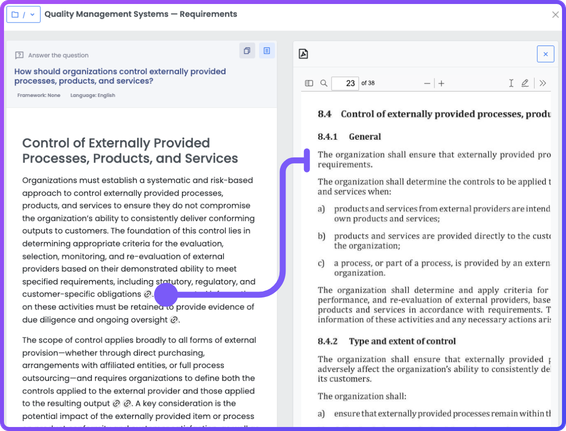
Link Claim to Source
Key Benefits

Why “Good Enough” Intelligence is Bankrupting You

The Hidden Costs of Modern Knowledge Work

Go to Document, page number
Each answer is grounder in your documents.
🔗 icon to jump to the exact source. By clicking the icon or a [document-page] citation opens the inline PDF viewer and jumps to that page.
Hallucinations in generic LLMs
~33%
Zero Hallucinations. 100% Citations. AI You Can Actually Trust.

Generic AI guesses; Doclarity proves. By working exclusively with your curated document library—and zero external data sources—we eliminate "hallucinations",. Every answer includes clickable citations, allowing you to verify insights against your own authoritative sources instantly,.

Doclarity Picto White
  • No third parties
  • No External APIs
  • No Retention
  • No Training
  • No Cloud Act
Stop the "Shadow AI" Leak. Build a Private Intelligence Vault.

77% of employees are pasting sensitive data into public AI tools. Doclarity offers a completely private AI infrastructure hosted in the EU, ensuring no data retention, no training on your files, and zero exposure to the US Cloud Act,. Transform your authoritative documents into a secure knowledge base without the risk.

  • Semantic Search
  • Research Thread
  • Write Document
  • Workspaces
  • Upload Document
End the Search Tax. Turn Static Files into Instant Answers.

Your analysts spend 70% of their time searching instead of analyzing,. Doclarity transforms your static PDFs and reports into a dynamic, queryable knowledge base. Reduce search time by 70% and unlock hidden insights across millions of pages in seconds, not hours.

  • Build Source Corpus
  • Summarize for Executives
  • Standardize SOP Format
  • Compose Decision Brief
  • Run Gap Analysis vs Standard
  • Compose Role Onboarding Guide
Deploy 168+ Expert Agents on Your Data.

Doclarity isn't just a search bar; it’s a workforce. Deploy specialized AI Agents to automate compliance gaps, synthesize field reports, and generate briefings using proven frameworks like SCQA and MECE,. Move from raw document storage to atomic planning and execution.

  • Upload Your Documents
    1
  • Private and Secure Inference
    2
  • Verified Answer, with citation
    3
Your Documents. Your Truth. Your Sovereign Brain.

Don't let an AI train on the internet's noise. Build your own library with your organization's official laws, regulations, and reports. Whether you manage ISO compliance or complex research, control exactly what your AI knows and ensure every output comes from your verified "Gold Standard" sources,.

Your Documents, Your Control

Reliable AI From
Your Own Authoritative Documents

Eliminate hallucinations and data leaks with a private, citation-backed intelligence platform that transforms static files into verifiable answers.

Multilingual Studio

Search, Query and Write in 10+ Languages with Cultural Precision

Find documents and create content in 10+ languages with natural fluency and cultural accuracy. Engage audiences worldwide authentically—no more generic translations.

Private Infrastructure
The "No-Leak" Promise

We do not use third-party APIs like OpenAI or Anthropic. We operate our own inference infrastructure. Your data never leaves our secure perimeter. No retention. No training on your data.

Retrieval-Augmented Generation (RAG)
Grounded in Your Documents

We use Hybrid RAG (70% Vector / 30% Keyword) to ground every answer in your specific documents. If the answer isn’t in your library, the AI will tell you—it won’t invent one.

Citation is Mandatory
Trust, But Verify

Every claim includes a [page-chunk] citation. Click it to open the Inline File Viewer and see the exact source paragraph instantly.

Not Just a Chatbot
A Complete Document Intelligence Platform

From documents to deliverables
Ingest sources, then generate cited outputs in
the editor or via Expert Agents.

Advanced Document Processing The Library Architecture Semantic & Hybrid Search Ask a Document Prompting the Library AI Write Tool Workspaces Expert Agents
Advanced Document Processing
(Input Intelligence)

The platform actively transforms “dark data” into intelligent assets immediately upon upload.
The Ingestion Pipeline uses Vision-Language Models to parse complex PDF layouts, understanding structure beyond raw text.

Advanced Document Processing
The Library Architecture
Public & Private

Curate a Public Library of authoritative organization-wide sources (laws, ISO standards) while giving users a Private Library for personal research.

Public Library
  • Contains organization-wide authoritative documents
  • Laws, regulations, official reports
  • Documents accessible to all members.
Private Library
  • Personal vault
  • User-specific uploads
  • Granular sharing levels: Private (Owner only), Shared (Specific users), or Workspace-level access.
The Library Architecture

Unlike generic web scrapers, this is a curated library where organizations upload their own “Authoritative Sources” to create a bounded, hallucination-free knowledge base.

Hybrid Search & Discovery
Semantic Understanding + Keyword Precision

Retrieval transcends keywords. A Hybrid RAG approach combines vector embeddings for intent with text indexing for precision.

Hybrid RAG

We combine Vector Search (70% weight) for conceptual meaning with NoSQL Text Search (30% weight) for exact keyword matches (e.g., finding specific ISO codes or acronyms).

Granular Filtering

Prompt the library using 33 filterable metadata fields—including Country, Source, Document Type, and Date Range—to constrain the AI before it even starts generating.

Hybrid Search & Discovery
“Ask a Document”
Contextual Q&A
Inline Intelligence

Users can open a specific document in an Inline File Viewer (PDF/DOCX/XLSX…) and ask questions strictly about that file.

Citation & Navigation

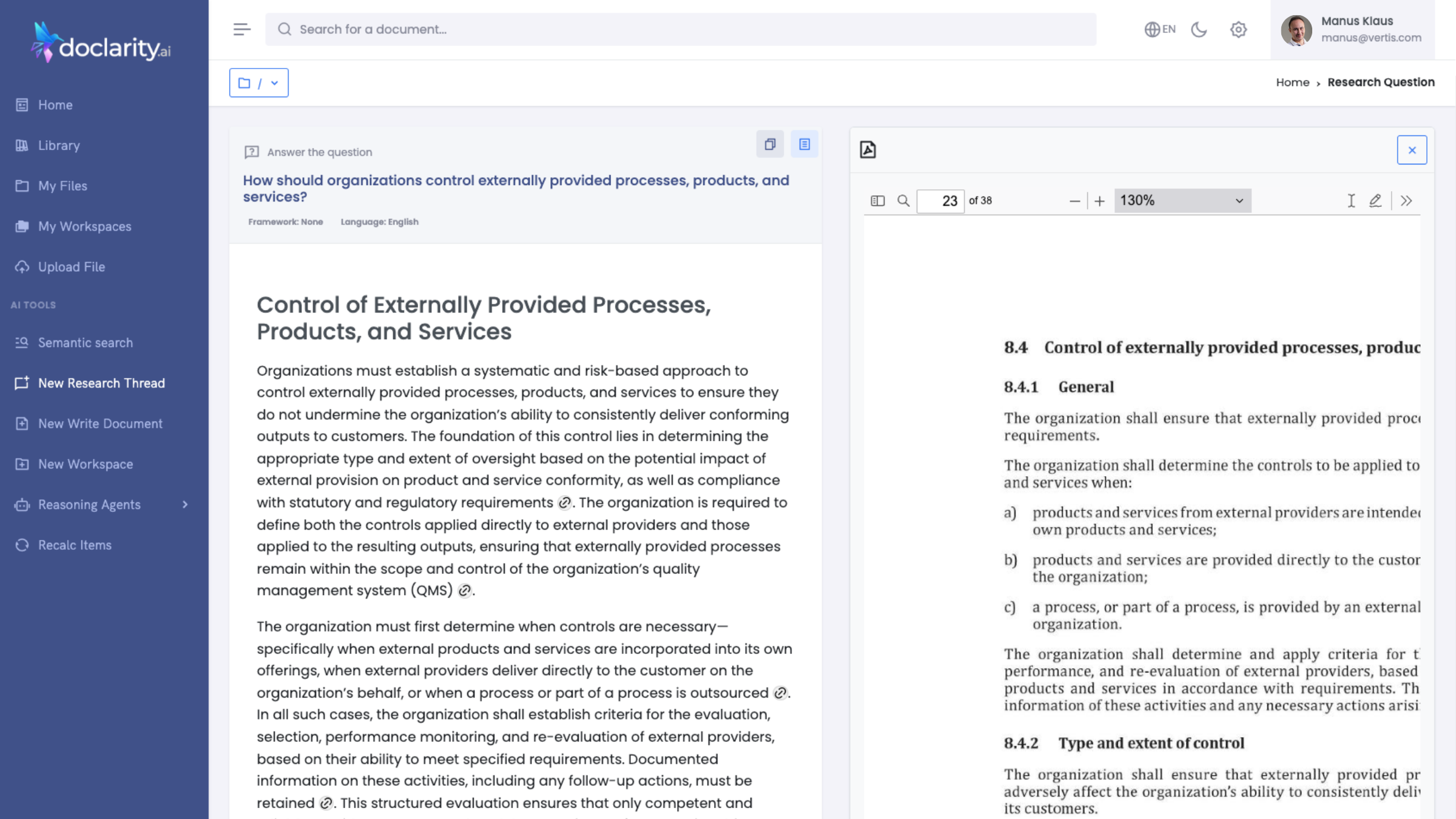
Every answer provides clickable [document-page-section] citations. Clicking a citation automatically scrolls the document viewer to the exact source paragraph, providing instant verification.

Doclarity Research Side by Side
Side-by-Side View

The interface supports split views to read the source document while simultaneously interacting with the AI research assistant.

Prompting the Library
Advanced Filtering

Interrogate the entire knowledge base with precision. Filters apply before retrieval, focusing the Al on relevant data subsets.

Advanced Filtering
Granular Filters
Filter by Country, Source/Publisher, Document Type, Subject, and Language.
Temporal Modes:Latest Mode: Restricts answers to the most current version of documents.
Point-in-Time: “What was the regulation valid on Jan 1st, 2023?”.
Range Mode: Search within specific date ranges.
Logic

The system applies these filters before retrieval to ensure the AI only reasons across the relevant subset of data (e.g., “Summarize education policy in Morocco published by the Ministry of Education in 2024”).

AI Write Tool
The Extensive Editor
Editor Tech

Built on a powerful AI rich text editor, supporting rich text, headings, and lists.
– Visual Generation: Generates interactive charts from document data.
– Diagrams: Creates diagrams for process flows.
– Formulas: Renders mathematical equations using LaTeX.

Templates & Frameworks

Includes 13+ templates (Press Release, Policy Brief, Lesson Plan) and 9 Analytical Frameworks (SCQA, MECE, Pyramid Principle) to structure the output professionally.

AI Write Tool
Workspaces
Team Collaboration & Source Focus
Subset Focus

Teams can create a workspace (e.g., “Audit 2025”) and populate it with a specific subset of documents and folders, isolating the context.

Shared Assets

Research threads, prompts, and draft documents are shared automatically with all workspace members.

Workspaces
Real-Time Collaboration

Powered by WebSockets, this allows concurrent editing. Users see “live cursors” and presence indicators (who is viewing/editing) similar to Google Docs.

Expert Agents
This is the platform’s advanced orchestration layer. It lists 168 Specialized Agents organized into categories.
Expert Agents
Agent Categories & Examples
  • Legal Mapping: “Generate Redline & Change Log” (diffs two document versions and summarizes changes).
  • Budget Overview: “Consolidate Budget Dataset” (reconciles multi-source budget tables).
  • Procurement: “Validate Tender Completeness” (checks bids against requirements).
  • QHSE (Quality): “Run Gap Analysis vs Standard” (maps internal SOPs to ISO clauses).
  • Universal Agents: “Redact Sensitive PII” (burns in redactions), “Convert PDF to Clean CSV” (extracts tables).

These agents are built using 18 specialized nodes (e.g., “Claim Detector,” “Chart Generator,” “Review Gate”) that can be visually assembled in a DrawFlow-based workflow builder,.

Security & Sovereignty Specs

Enterprise-grade protection for your data, No matter your size
Hosting

CPU/Storage in Germany 🇩🇪, GPUs in Finland 🇫🇮

Isolation

Complete data isolation, from database, storage and even private AI endpoints.

Compliance

All infrastructure providers are SOC 2 Type II, ISO 27001, and GDPR compliant

No Cloud Act Risk

By avoiding US-owned hyperscalers for core storage, we protect your sovereignty

FAQs

Got Questions?
We’ve Got Answers.

Find quick answers or contact our support team.

1. What is Doclarity.ai?
Doclarity.ai turns your organization’s documents (policies, reports, standards, manuals, contracts…) into a private, searchable knowledge base. You can search by meaning, ask questions, and generate citation-backed outputs (briefs, summaries, audits, SOPs, etc.).
2. What file types do you support? Do you handle scanned PDFs?
Yes. You can upload PDF, DOCX, TXT, and images. Scanned documents are supported via OCR and a Vision AI Model so they become searchable and usable for Q&A.
3. What’s the difference between Public and Private Libraries?
- Public Library: shared across your organization; everyone can search and view it (uploads typically restricted to admins).
- Private Library: your personal vault; you decide what stays private, what’s shared with specific users, workspaces, or promoted to public.
4. Can my team collaborate?
Yes—via Workspaces. A workspace groups documents, research threads, and generated deliverables so teams can collaborate with shared context and structured folders.
5. Can I generate deliverables (reports, policy briefs, audit packs) and export them?
Yes. Doclarity includes a Document Writer with frameworks/templates, and you can export outputs (e.g., DOCX / PDF / Markdown depending on your workflow).
6. What are “AI Expert Agents”? Do I need to build workflows?
You can run pre-built Expert Agents (168+ templates) for common deliverables (compliance mapping, audit prep, policy briefs, etc.). Advanced users can also use the visual agent builder (nodes + parameters) to compose repeatable workflows.