
Built for
Proposed rows come from your audit reports, minutes and records, each with its source.

 English
Solutions
Registers
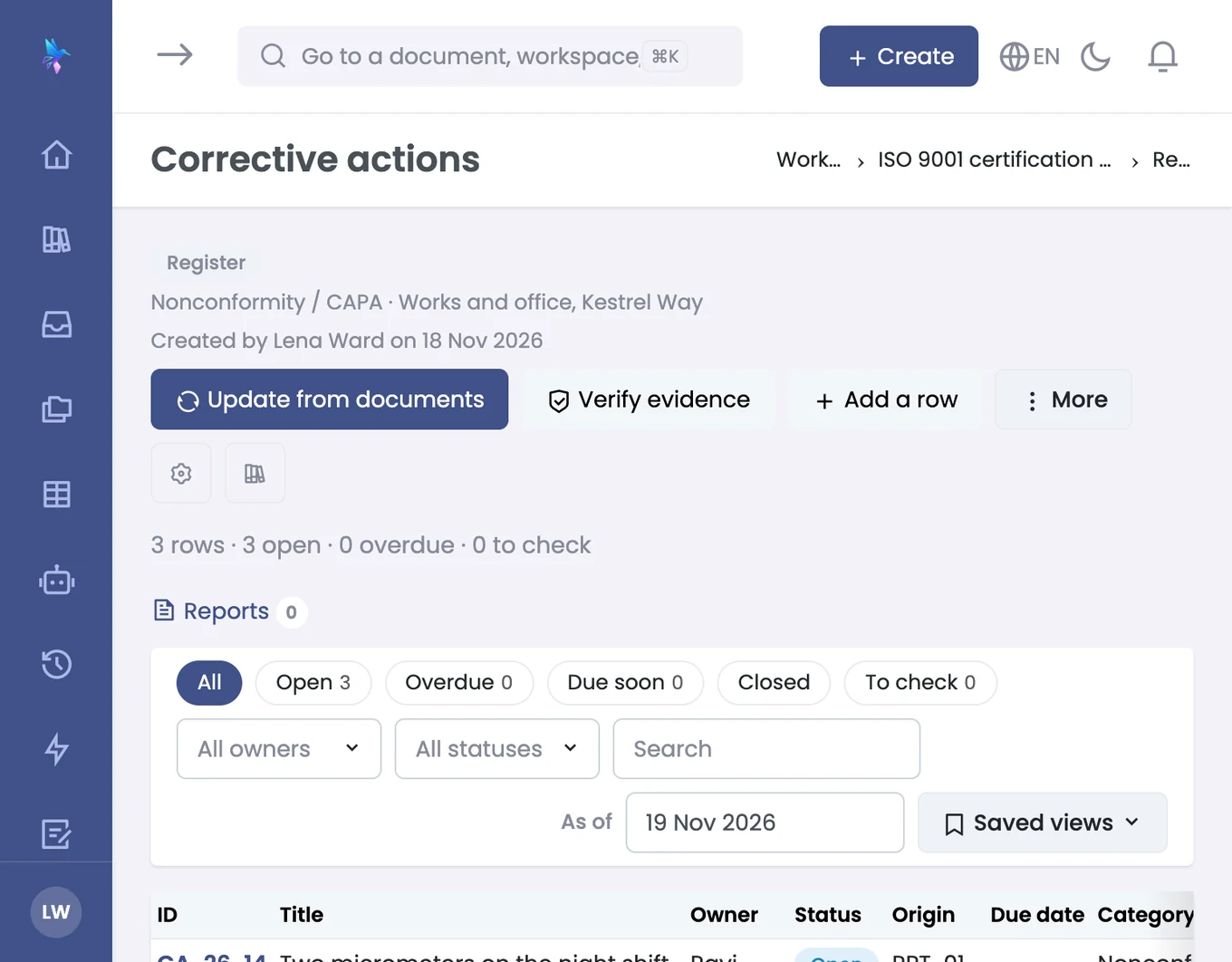
Each proposed row shows the document and page it comes from, and a person confirms it before it counts. Registers you already keep import from Excel. You review it, and it's ready.
Proposed rows come from your audit reports, minutes and records, each with its source.
A person confirms or rejects every proposed row. Nothing is added on its own.

« Verify evidence » looks for the proof behind each row and says whether it is found, missing or contradicted.
Why it matters
Action logs, nonconformity registers and training records are among the first files an auditor asks for. Keeping them current means reading audit reports, minutes and certificates, then typing each row by hand. Over time the rows drift away from their evidence. A due date moves in a meeting, a training certificate expires, an action is closed without proof, and nobody notices until the audit.
Doclarity reads the documents you upload and proposes register rows: an action, a nonconformity, a training record. Each row carries the document and page it comes from. A person confirms or rejects each proposal. Overdue actions and expired training are flagged, and you can set the date the register is read for, such as the audit date. Doclarity does not replace a CAPA workflow tool. It keeps the registers your quality system relies on tied to the documents that prove them.
Capabilities
Doclarity proposes rows from the audit reports, meeting minutes, certificates and other records you upload.
Each row shows the document and the page or spreadsheet row it comes from, and the link opens it.
Proposed rows wait for a person to confirm or reject them. Nothing counts until someone accepts it.
For each row, Doclarity looks for the evidence in your documents and tells you whether it is found, missing or contradicted.
Open actions past their due date and expired training records are flagged, with filters for open, overdue and due soon.
Set an « as of » date, such as the audit date, and overdue status is worked out for that day.
Registers you already keep in a spreadsheet import as they are, and each row stays linked to the file.
Actions, nonconformities, training records, risks and opportunities, incidents, audit findings, compliance obligations and more.
Create a dated report of a register, then open it in the editor to share it.
A document Doclarity wrote never counts as closure proof. « Verify evidence » accepts only your own documents.
| Need | Spreadsheet | QMS software | Doclarity |
|---|---|---|---|
| Keep a list of actions or nonconformities | Yes | Yes | Yes |
| Link each row to its source document | Manual | Variable | Yes |
| Propose rows from audit reports and minutes | No | Rarely | Yes |
| Flag overdue actions and expired training | Manual | Yes | Yes |
| Check the evidence behind each row | No | Variable | Yes |
| Run a full CAPA workflow | No | Yes | No |
Doclarity is not a CAPA workflow system. It does not route approvals or manage investigations. It keeps your registers current and tied to their evidence.
Workflow
Add audit reports, minutes, certificates, or the spreadsheet you already keep.
Doclarity proposes rows, each with its document and page. Confirm or reject each one.
Run « Verify evidence » to see which rows have proof and which do not.
Set the audit date and create a dated report of the register.
Use cases
Upload the latest audit reports and review the nonconformities Doclarity proposes, each with its source.
See which training records have expired, with the certificate behind each one.
Turn the actions decided in the minutes into register rows with an owner and a due date.
Use « Verify evidence » to see whether each closed action has proof in your documents.
Create a register inside a workspace, so an audit or a review keeps its own records.
Set the audit date and create a dated report of the register for the auditor.
Teams
Doclarity is less suited if your main need is a full CAPA workflow with approvals, investigations and electronic signatures. It can sit next to that tool and keep the registers tied to their evidence.
 action logs; nonconformity or CAPA registers; training records; risks and opportunities; incident logs; audit findings; compliance obligations.
FAQ
No. Doclarity proposes rows. A person confirms or rejects each one before it counts.
From the documents you upload. Each row shows the document and the page or spreadsheet row it comes from.
Yes. Registers kept in Excel import as they are, and each row stays linked to the file.
No. Doclarity does not route approvals or manage investigations. It keeps your registers current and tied to their evidence.
« Verify evidence » says so. A row without proof is shown as missing, never filled with something that sounds right.
Actions, nonconformities, training records, risks and opportunities, incidents, audit findings, compliance obligations and more.
Solutions
Doclarity proposes register rows from your own documents, with the source on every row. You review it, and it's ready.
 Sourced Up to date Honest