
Built for
The note for decision gives the person who decides one page: the decisions to take, then what stays open.

 English
Solutions
Decision notes
The note lists the decisions to take, each with its evidence and the owner your documents name, then what stays open. Every point links to its passage. You review it, and it's ready.
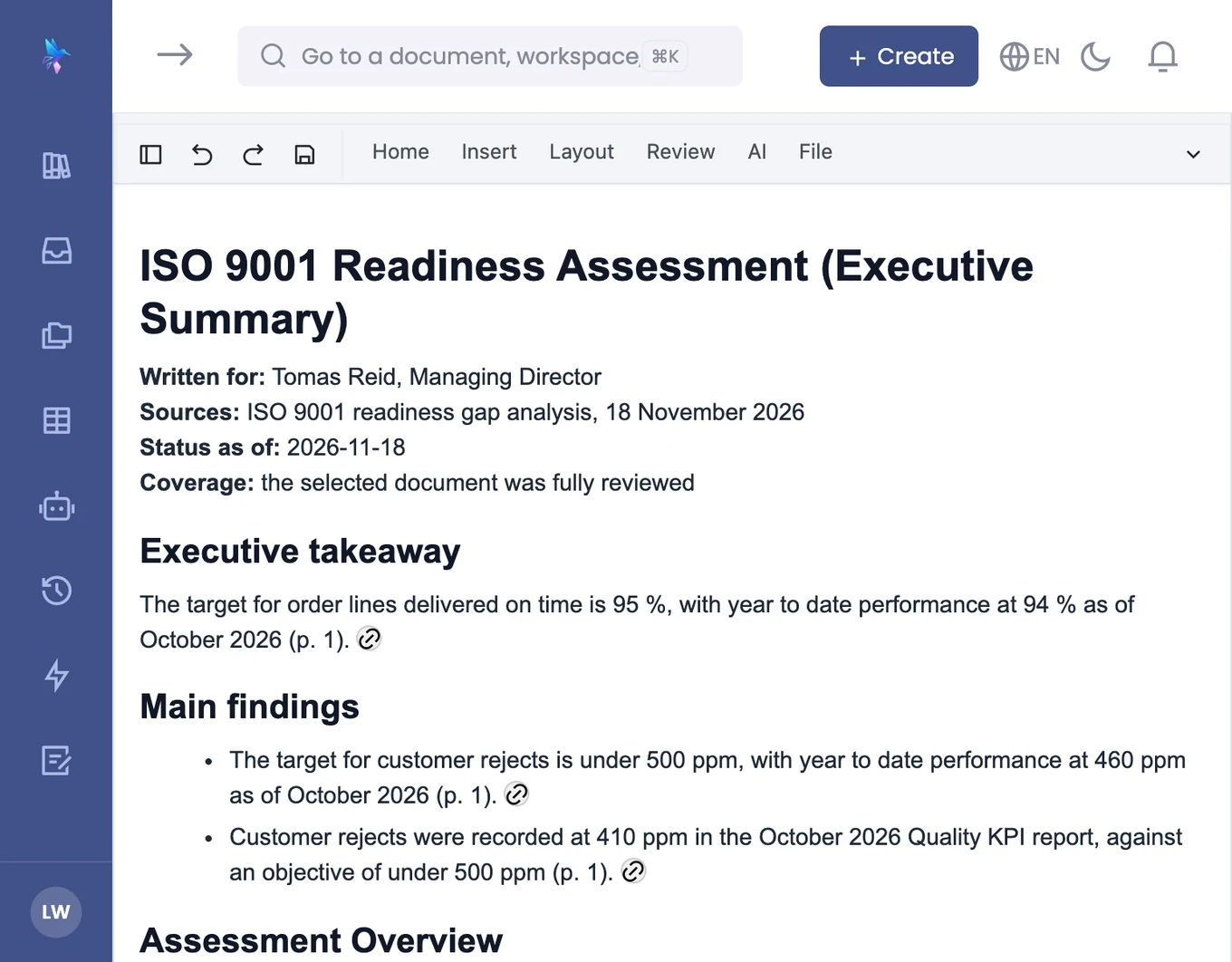
The note for decision gives the person who decides one page: the decisions to take, then what stays open.
« Summarize for Executives » writes a summary for a board or a director, checked against the documents.

« Extract Actions from Minutes » turns meeting records into an action list and a decision log.
Why it matters
Before a board, a committee or a management review, someone has to turn reports, registers and minutes into a page the decision maker can read. Written in a hurry, that page loses its sources. Then the questions start. Where does this figure come from? Who owns this action? Was this point settled last time? Without the passage, the note cannot answer, and the meeting spends its time checking.
At the end of a job in a workspace, the note for decision reads what the work has already established: the registers, the facts matched in the documents and the latest results. It lists the decisions to take, each with its evidence and the owner your documents name, then what stays open. For a board or a director, « Summarize for Executives » writes a self-contained summary: the central finding, the key findings, the exceptions and the sources, checked against the documents. After the meeting, « Extract Actions from Minutes » builds the action list and the decision log, with owners and due dates, so the decisions can be followed.
Capabilities
The decisions to take come first, in plain words, on a single page.
Each decision carries the evidence behind it, and the link opens the passage.
Each decision names the owner your documents give. When they name no one, the note does not invent an owner.
Points the documents leave unsettled are listed after the decisions, so nothing is hidden.
The note reads the workspace's registers and the job's latest results. It does not read every document again.
« Summarize for Executives » gives the central finding, key findings, exceptions and sources in one self-contained summary.
Choose the audience and the length of the summary before you run it.
« Extract Actions from Minutes » lists owners, due dates or triggers, related decisions and changes to earlier actions.
Keep decisions, commitments and recommendations in registers, each with its source and its owner.
Decisions your documents record are kept with their date. When the same body decides again, the later decision replaces the earlier one.
| Need | By hand | Chat assistant | Doclarity |
|---|---|---|---|
| Link every point to its passage | Manual | Rarely | Yes |
| Name only the owners the documents give | Manual | Rarely | Yes |
| List what stays open | Manual | Rarely | Yes |
| Follow decisions after the meeting | Manual | No | Yes |
| Take the decision | No | No | No |
Doclarity prepares the note. The person who decides still decides.
Workflow
Gather the documents of one matter, run the analyses and keep the registers.
Choose « Note for decision » at the end of the job. Doclarity reads the registers and the latest results.
Check each decision, its evidence and its owner. One click opens the passage.
The person decides. Actions and decisions go into registers to be followed.
Use cases
Give the board a summary of the reports on the table, with the source behind each finding.
At the end of a management review workspace, list the decisions management has to take.
After preparing an audit, see what is ready, what is missing and what calls for a decision.
Turn the gaps found into decisions to take, each with its evidence.
Get the actions and decisions of a meeting, however long the records, with owners and due dates.
Keep what was decided or recommended in a register, and see what is overdue.
Teams
Doclarity is less suited if you need a meeting tool with agendas, votes and electronic signatures. It prepares the note and keeps the decisions tied to their evidence.
 board and committee papers; notes for a director or a minister's office; management review decisions; follow-up of audit or inspection results; decision logs from long minutes.
FAQ
No. The note lists the decisions to take, with their evidence. The person who decides still decides.
From your documents and the work done in the workspace. Each point links to its passage.
The note does not invent one. It shows that no owner is named.
The note for decision runs at the end of a job in a workspace. « Summarize for Executives » and « Extract Actions from Minutes » run on any documents you select.
Yes. Choose the audience and the length of the summary, and Doclarity writes for that reader.
Yes. Before you share, Doclarity tells you which cited sources the recipients cannot open. They see « Restricted source » in place of the title and the quote.
Solutions
Doclarity prepares decision notes and board summaries from your own documents, with every point linked to its passage. You review it, and it's ready.
 Sourced Up to date Honest