Built for
« Prepare an audit » opens a workspace with the registers an auditor asks for, ready to fill from your documents.

 English
Solutions
Audit preparation
Doclarity looks for the evidence behind each action and tells you whether it is found, missing or contradicted, with the passage. The master list shows which edition was in force on the audit date. You review it, and it's ready.
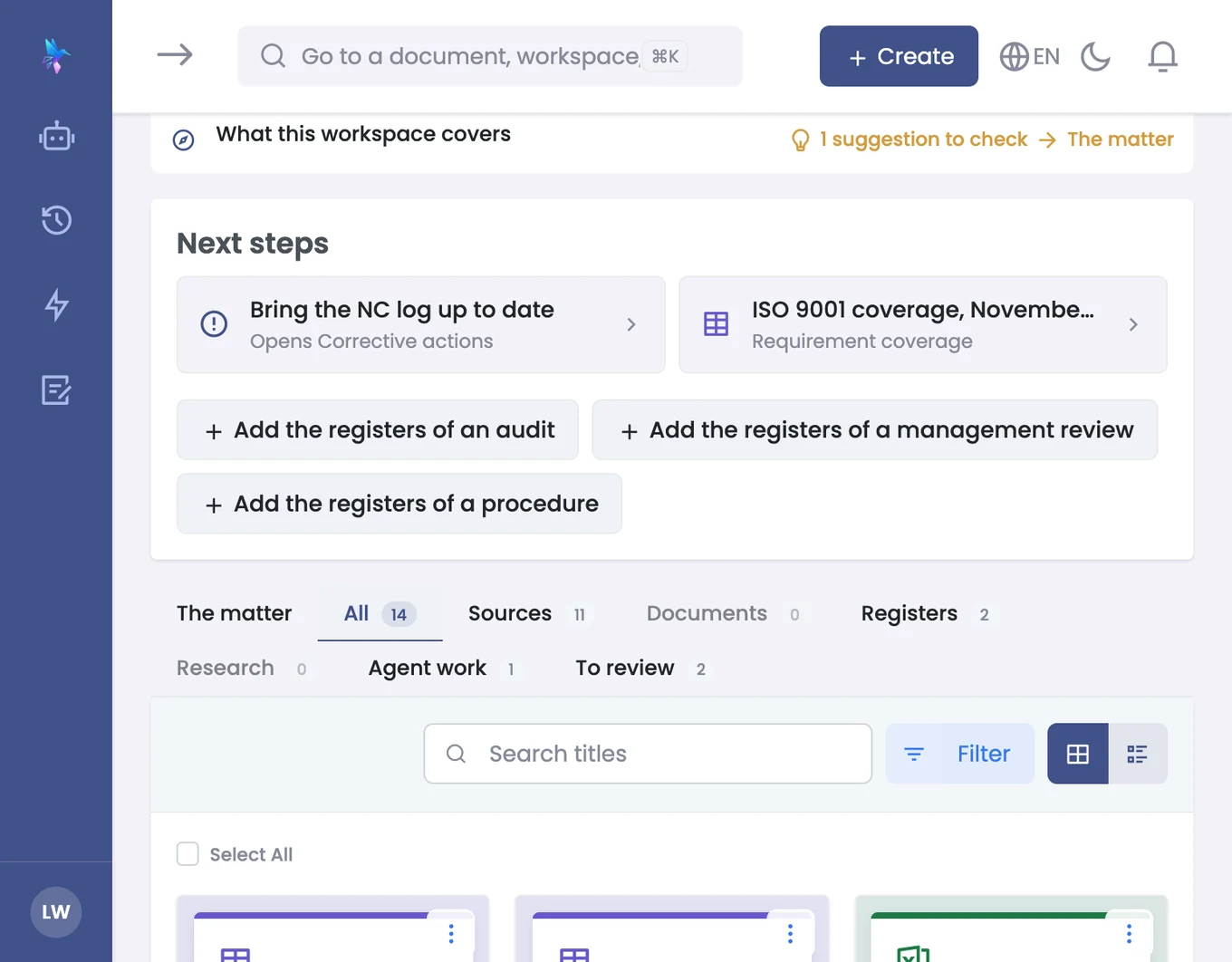
« Prepare an audit » opens a workspace with the registers an auditor asks for, ready to fill from your documents.
« Verify evidence » looks for the proof behind each row and quotes the passage it finds.

Set the audit date, and overdue actions, expired training and documents due for review are read for that day.
Why it matters
Before a certification audit, someone has to check that each corrective action is really closed, that training is current and that every document on the master list is the edition in force. That means opening folder after folder. Gaps show up late. An action marked closed has no proof, a certificate expired last month, a procedure was due for review and nobody started the new edition. The auditor finds it first.
Start « Prepare an audit » and Doclarity creates a workspace for it, with registers for nonconformities and corrective actions, training records, the master document list and the proof to ask for. « Verify evidence » reads the documents of the workspace and, for each row, looks for the proof of closure and for anything that contradicts it. Each finding is a quote from a document. Nothing in the register changes until you confirm it. Set the audit date, and the registers show what is overdue or expired on that day. The master list shows the edition in force on that date and the documents whose review is due.
Capabilities
« Prepare an audit » gathers the documents, registers and results of one audit in a workspace of its own.
For each row, Doclarity looks for the proof in your documents and says whether it is found, missing or contradicted.
Every piece of evidence is a passage found in a document, with the link that opens it.
What « Verify evidence » finds arrives as proposals. The register changes only when you accept them.
Set an « as of » date, and overdue actions and expired training are worked out for that day.
Each controlled document with its edition in force, and the documents whose review date has passed.
A register of the evidence still missing, so you know what to ask for before the auditor does.
From the same workspace, check your documents against the standard, clause by clause.
Create a dated report of each register for the audit, then open it in the editor to share it.
Documents due for review come to your review list before their date. Mark each one reviewed or set it for later.
| Need | Shared folders | QMS software | Doclarity |
|---|---|---|---|
| Keep nonconformity and training registers | Manual | Yes | Yes |
| Look for the proof behind each closed action | Manual | Rarely | Yes |
| Quote the passage that proves or contradicts it | No | No | Yes |
| Show the edition in force on the audit date | Manual | Variable | Yes |
| List the evidence still to ask for | Manual | Variable | Yes |
| Plan audits and record findings on site | No | Yes | No |
Doclarity does not plan audit programmes or record findings on site. It prepares the evidence your quality system relies on and shows what is missing before the audit.
Workflow
Name the audit, add your documents, and Doclarity creates the workspace and its registers.
Review the rows Doclarity proposes from your audit reports, certificates and lists, or import the spreadsheets you keep.
Run « Verify evidence » and confirm what it finds, row by row.
Set the audit date and create a dated report of each register.
Use cases
Upload the latest audit reports and review the nonconformities Doclarity proposes, each with its source.
See which training records have expired on the audit date, with the certificate behind each one.
See which documents are due for review and which edition of each is in force.
Run « Verify evidence » to see whether each closed action has proof, and whether a document contradicts it.
Use the « Proof to ask for » register to collect the missing evidence from the right people.
Set the audit date and create a dated report of each register.
Teams
Doclarity is less suited if you need a tool to plan audit programmes, assign auditors and record findings on site. It can sit next to that tool and keep the evidence ready.
 a certification audit; a surveillance or recertification audit; an internal audit; a customer audit; an inspection by an authority.
FAQ
A workspace for the audit, with registers for nonconformities and corrective actions, training records, the master document list and the proof to ask for.
No. What it finds arrives as proposals. A person confirms each one before the register changes.
The row is shown as missing, never filled with something that sounds right. You can add it to the proof to ask for.
Your library keeps the editions of each document and which one replaced which. The master list reads that for the date you choose.
Yes. Registers kept in Excel import as they are, and each row stays linked to the file.
No. Doclarity prepares the evidence and shows what is missing. The auditor makes the findings.
Solutions
Doclarity checks the evidence behind each row of your registers, from your own documents, and shows what is missing. You review it, and it's ready.
 Sourced Up to date Honest